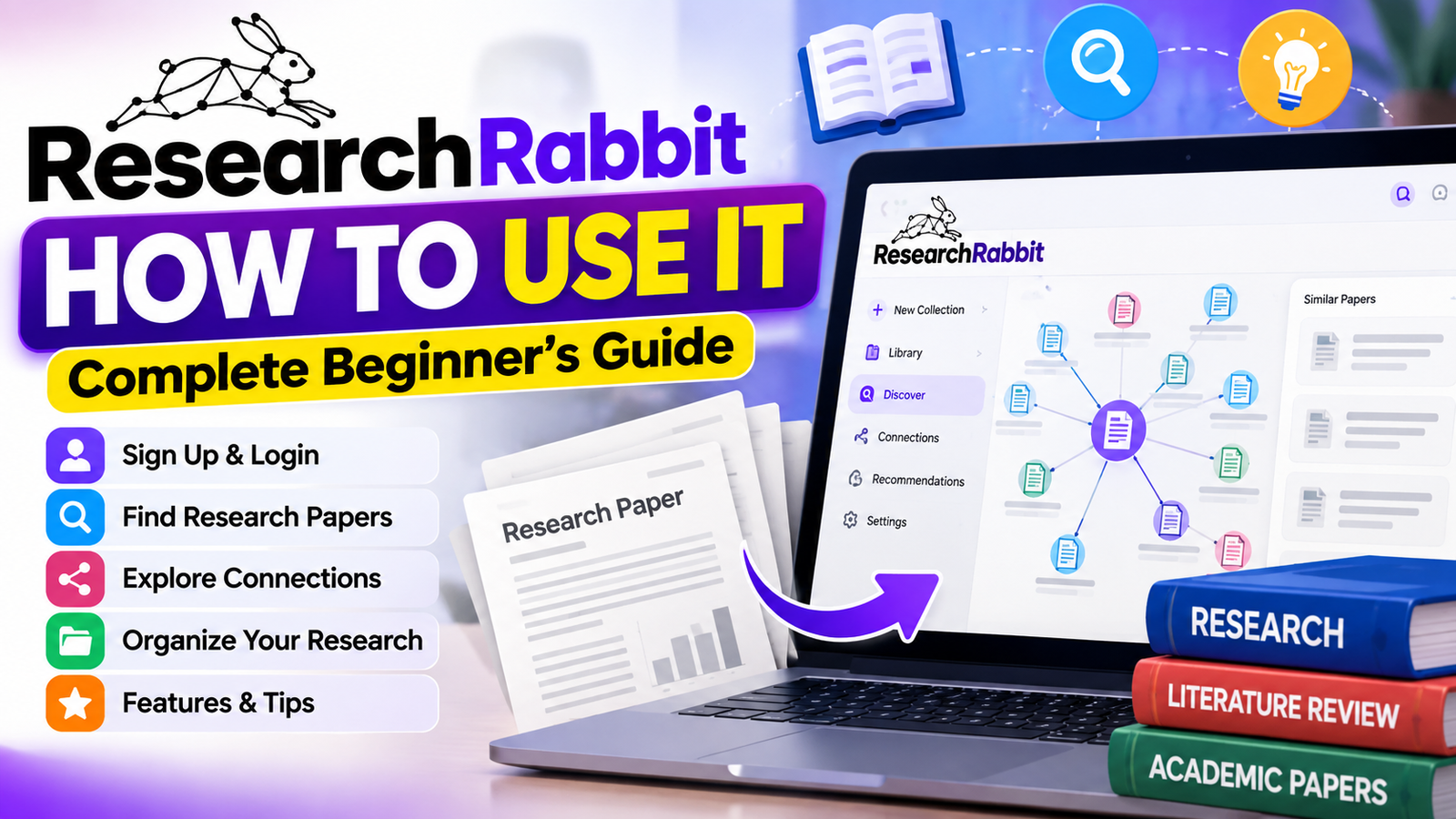
Finding the right academic papers can feel like searching for a needle in a haystack. Sifting through hundreds of citations and related studies can become slow and overwhelming. The researchrabbit tool gives you a better way to manage your workflow and stay organized.
This researchrabbit tutorial offers a clear path for mastering your literature search. The powerful tool helps you find relevant academic papers and map connections between studies. It also makes data easier to handle, so your academic journey feels smoother.
This researchrabbit guide shows you how to set up your account and use the platform effectively. We cover essential features that support smarter research. Students and professionals can spend less time searching and more time analyzing findings.
Key Takeaways
- Learn how to streamline your academic literature search process.
- Discover how to map scholarly connections between different research papers.
- Master the steps to create and manage your own research collections.
- Understand how to use automated alerts to stay updated on new studies.
- Improve your overall research efficiency using modern AI-driven tools.
What Is ResearchRabbit?
To understand how does researchrabbit work, see it as a digital assistant for academic discovery. It helps you navigate vast scholarly literature, map paper links, and organize findings into structured collections. This researchrabbit guide explains how to manage that process.
“The greatest value of a project is not just in the data it collects, but in the connections it reveals between disparate ideas.”
How ResearchRabbit Helps With Academic Research
ResearchRabbit shows how academic papers connect. Rather than using static search results, you can explore a live network of citations and co-authorship. This visual approach helps you spot influential studies and new trends in your field.
ResearchRabbit is a discovery engine, not a replacement for your analysis. You still need critical reading and careful source evaluation to protect your work’s quality. It helps you find useful materials faster during your literature review.
Who Can Use ResearchRabbit?
The platform supports anyone doing academic or professional research. A university student can use it for a thesis, while an independent learner can explore a new topic. Its interface stays intuitive and accessible. Experienced researchers use it to manage large-scale AI-related investigations and track changing research areas.
How to Sign Up for ResearchRabbit

Learning how to sign up for researchrabbit helps you manage academic literature. Your account maps scholarly connections and organizes findings into clear collections.
Open the ResearchRabbit Website
Visit the official ResearchRabbit website with your preferred web browser. Its clear interface helps you begin quickly. Ensure you are on the correct domain to protect your data and access the latest features.
Create Your ResearchRabbit Account
On the homepage, find the registration button to start the researchrabbit sign up process. You can register with an institutional email or personal account. These steps save your research history across different devices.
Complete the Initial Setup
After verifying your email, complete the brief profile setup. This researchrabbit tutorial for beginners recommends reviewing your preferences and research interests. Carefully selecting your initial topics helps provide accurate recommendations for your first collection.
How to Log In to ResearchRabbit
Your account opens the door to academic discovery. A standard researchrabbit login restores immediate access to saved collections, citation maps, and ongoing literature projects.
A steady workflow supports effective academic research. Signing in keeps your discovered papers and author connections synchronized in your personal dashboard.
ResearchRabbit Login Steps
Follow these steps to connect to your workspace and access your data. If problems arise, check your internet connection or clear your browser cache.
- Navigate to the official website in your preferred web browser.
- Locate the researchrabbit login button typically found in the top corner of the homepage.
- Enter the email address and password associated with your registered account.
- Click the submit button to enter your personalized research environment.
Always ensure you are using the official portal to protect your account information. If you forget your password, use the recovery link on the sign-in page to regain access to your research library.
How to Use ResearchRabbit Step by Step

Learning how to use ResearchRabbit step by step can improve your literature search. With a clear workflow, you can turn one seed paper into an organized library of relevant academic sources. This researchrabbit ai research tool maps scholarly links instead of only checking each document’s quality.
Start a New Collection
Start by creating a dedicated space for your project. Think of it as a digital folder for your findings. Learning how to use researchrabbit ai starts here and keeps your research focused and tidy.
Add a Research Paper
Next, add a seed paper to begin the process. Search by title, DOI, or URL inside the interface. This starts the researchrabbit paper discovery engine, which scans for literature related to your input.
Explore Related Papers
After you add the seed paper, ResearchRabbit suggests similar works. It uses citations and shared topics to make these suggestions. This is crucial for fast learning. Learning how to use researchrabbit step by step helps filter by date or relevance and stay current with latest findings.
Discover Authors and Research Connections
Finally, explore the scholar network behind the papers. You can see how authors connect through collaboration and shared research interests. Use this network as an effective way to how to find research papers with researchrabbit while mapping your field’s academic landscape.
Key Features of ResearchRabbit
You can change how you find and organize scholarly information with the unique researchrabbit features. This platform acts as a sophisticated hub connecting your ideas to a vast web of academic knowledge. These tools create a more efficient, clear research workflow for your daily routine.
Paper and Literature Discovery
Finding the right starting point matters for every project. This researchrabbit research tool lets you enter a seed paper and instantly receive highly relevant suggestions. Advanced algorithms scan databases, so you do not miss a critical study in your field.
Citation and Research Connections
The platform shows how different studies connect. With the researchrabbit citation network, you can trace an idea and find papers that influenced current AI research. This visual map helps you understand how complex topics develop over time.
“The best way to predict the future is to invent it, but the best way to understand the present is to map the connections of the past.”
Author and Topic Exploration
You can also explore the experts behind each paper. The system lets you track authors and view their entire body of research. This feature helps you identify key influencers and emerging trends within the AI community.
Collections for Organizing Papers
Keeping your findings organized supports long-term success. You can create custom collections for each project, theme, or priority. This researchrabbit research tool keeps your gathered data accessible and well-structured throughout your study.
- Visual Mapping: Easily track the researchrabbit citation network to see how papers link together.
- Smart Suggestions: Discover new literature based on your existing collection.
- Author Tracking: Stay updated on the latest work from leading experts in your field.
- Efficient Organization: Use collections to manage your library of academic resources.
How to Use ResearchRabbit for Literature Reviews

Learning how to use ResearchRabbit for literature review helps you move beyond static lists and explore scholarly work visually. It helps you build a strong writing foundation by revealing hidden connections between authors and topics.
Finding Relevant Papers
Start by finding a few “seed” papers that closely match your topic. Add them to a collection to begin a researchrabbit literature search. It automatically suggests similar articles through citation patterns and shared references, expanding your scope beyond one keyword search.
“The best research is not found in isolation, but through the interconnected web of ideas that define our collective knowledge.”
The platform aids discovery, but you must evaluate each paper carefully. Always assess the methodology, publication quality, and relevance of every paper you find. Use ResearchRabbit as a starting point so you do not miss key foundational studies while building your bibliography.
Following Research Trends and Connections
After building a collection, you can map scholarly relationships between papers. This feature supports a researchrabbit literature review by showing how researchers influence each other over time. You can track a theory’s growth or find key authors in a field.
Use these practices to keep your work organized:
- Group your findings into thematic collections to maintain clarity.
- Use the visual graph to identify clusters of related research.
- Regularly update your collections as you perform a new researchrabbit literature search to capture the latest publications.
Visual maps give you a deeper view of the academic landscape. This workflow helps make your final literature review comprehensive, well-structured, and grounded in the most relevant scholarly conversations.
ResearchRabbit for Students and Researchers
Whether you are starting your academic journey or managing a long-term research project, ResearchRabbit offers tools for success. The platform acts as a digital assistant that adapts to your level of expertise. It streamlines how you use scholarly databases, helping you save time and focus on deep learning.
When using researchrabbit for students, your main goal may be learning unfamiliar topics quickly. Build a foundational paper collection to see how different concepts connect. This workflow suits literature reviews and thesis preparation because it keeps sources organized and easy to retrieve.
In contrast, researchrabbit for researchers offers advanced tools for mapping complex scholarly relationships. Experienced academics use it to trace a theory’s development or find key authors in a niche field. By tracking citations and emerging connections, you can stay ahead in your area of study.
At any academic stage, the platform offers several essential benefits for improving your workflow:
- Efficient Discovery: Quickly find relevant papers that align with your current research interests.
- Visual Mapping: See how different studies relate to one another through interactive network graphs.
- Source Management: Keep your references organized in custom collections for easy access.
- Trend Tracking: Monitor new publications from influential authors to stay updated on recent developments.
Ultimately, the platform bridges raw data and meaningful insights. These features let you spend less time searching and more time analyzing important connections in your work.
Pros and Cons of ResearchRabbit

ResearchRabbit offers powerful discovery features, but it also has limits. A thorough researchrabbit review shows how it streamlines the early stages of literature searches.
A key strengths of the tool is its ability to show complex scholarly connections. You can map how papers relate, helping you find foundational studies and emerging trends in your field.
The platform also lets you organize sources into clean, manageable collections. This helps you manage large amounts of academic material. Its visual interface makes discovery feel more intuitive than traditional database searches.
However, a balanced researchrabbit review must include caution. Its algorithm suggests relevant papers, but it cannot replace critical thinking. You must perform independent verification to ensure each source meets your academic standards.
The software is a powerful assistant, not a replacement for your judgment. Read every paper carefully before adding it to your collection. Combining this tool’s efficiency with your analytical skills can build a strong foundation for your research projects.
Is ResearchRabbit Free to Use?
Knowing your research tool’s cost helps you plan your academic work. Many scholars need affordable ways to map connections between scholarly sources. ResearchRabbit currently costs nothing, making it useful for students and independent researchers.
The platform helps with complex tasks like finding papers and organizing sources. You can use its full feature set to build collections and view research networks without a paid subscription. However, it is always wise to verify the current terms of service directly on their official website.
When choosing a tool, consider how its features support your specific goals. Review these factors before spending time on a new platform:
- Feature Availability: Ensure the tool provides the specific discovery capabilities you require for your literature reviews.
- Data Privacy: Review how your research collections and personal data are handled by the service provider.
- Platform Stability: Check if the service is actively maintained and updated to support modern research standards.
- Future Changes: Keep in mind that service models can evolve, so stay informed about any potential updates to pricing or access.
“The best tools for researchers are those that remove barriers to knowledge, allowing for seamless exploration and discovery.”
These points can help you add this tool to your research process with confidence. Whether mapping a new topic or tracking the latest trends in your field, a reliable, accessible resource is valuable. Always check the platform’s official documentation for the most accurate information about its current access model.
ResearchRabbit Tips for Better Research

Learning how to use ResearchRabbit for research takes more than basic searches. A clear plan can improve how you collect and organize scholarly information.
Begin with high-quality seed papers. These first sources support your project, so choose papers that fit your field and have many citations.
After choosing seed papers, explore their connections. Map citations and find influential authors who often appear in your study area.
“The quality of your research output is directly proportional to the depth of your source exploration and the rigor of your critical analysis.”
To gain the most from the researchrabbit features and benefits, try these daily workflow strategies:
- Maintain focused collections: Keep your projects organized by creating specific collections for different research themes or sub-topics.
- Review sources critically: Always verify the credibility of the papers you discover, as automated tools should supplement—not replace—your own academic judgment.
- Monitor new updates: Regularly check your collections for new additions or related papers that might have been published recently.
- Leverage author connections: Follow key researchers in your field to stay informed about their latest contributions and collaborative efforts.
Stay organized and examine findings carefully to make your research process more efficient. Consistency is key when managing large volumes of academic literature, so make these habits part of your routine.
ResearchRabbit FAQs

To help you get the most from ResearchRabbit, we compiled answers to frequent questions. They address common concerns for new users who want to improve their academic workflow.
What is ResearchRabbit used for?
ResearchRabbit is a powerful discovery tool for academics and students. Use it to find research papers, map links between authors, and organize sources into collections.
It shows links between studies, helping you find connections that regular search engines might miss. It acts as a personalized research assistant that grows with your interests.
Is ResearchRabbit free?
The platform is currently free for researchers and students. This access helps people improve productivity without extra costs.
Still, verify the latest terms of service on the official website. Features and access models can change, so check the platform for accurate information.
Can ResearchRabbit help with literature reviews?
Yes, it is designed to make literature reviews more efficient. Use the tool to automatically find related papers and track citation networks.
You can spend less time searching for sources and more time studying the literature. It is a game-changer for staying organized as you synthesize complex information for your projects.
How do I create a ResearchRabbit account?
Creating an account takes only a few minutes. Visit the official website and follow the prompts to register with your email address.
After signing up, you can build your first collection right away. Be sure to complete your profile setup for relevant recommendations based on your research interests.
Final Thoughts on ResearchRabbit
ResearchRabbit changes how you navigate academic literature. It streamlines paper discovery and scholarly connections, supporting your AI research workflow.
You now have a clear path to success. Create a dedicated collection, add your core papers, and explore authors and related studies. This method saves time and keeps you updated on critical developments in your field.
Technology simplifies searching, but critical judgment remains essential. Use these digital insights to build a foundation for your work. Your evaluation of source quality and relevance will shape your final literature review.
Start your next project with confidence. Dive into your first collection today and see how connections sharpen your academic focus. Your research journey becomes more efficient when you use the right tools to map the intellectual landscape.